



Posted by Michele Negri
05 Mar, 2026
Implement Ground-Centric Logic
I am writing to request a critical update to SurPad’s coordinate system management. Currently, SurPad is unusable for professional construction surveying because its mathematical logic is the exact opposite of industry standards like Stonex Cube-a. The Fundamental Flaw: SurPad vs. Stonex Logic SurPad Logic (Grid-Centric): Your software treats the Map (Grid/Ellipsoid) as the absolute truth. It forces physical ground measurements to "shrink" or "stretch" to fit a cartographic projection. This is a "backwards" approach for site surveyors. Stonex Logic (Ground-Centric): Stonex treats the Ground as the absolute truth. It captures the Combined Scale Factor from the very first point received by the GNSS and locks it. It then adapts the coordinate system to the physical reality of the site, ensuring a consistent 1:1 scale. The Evidence (Real Field Tests): In my tests, SurPad constantly recalculates the scale factor as I move, leading to unacceptable discrepancies: Point A: Combined Factor 0.999978. Point B: Combined Factor 1.000008. Because the software works "backwards," I am forced to "trick" it by entering false elevations (e.g., -3000m) just to try and reach a 1.000000 scale. This is prone to error and unprofessional. Requested Feature - "Ground Mode": I request a feature that allows SurPad to operate like Stonex: Capture & Lock: The software must derive the Scale Factor from the first measured point (Origin) and lock it for the entire project. 1:1 Ratio: It must ensure that 100 meters measured by GNSS equals 100 meters on the ground (Total Station compatibility). Geoid Adaptation: It must adapt these measurements to the Geoid (Square/Quadratic) for correct elevations without distorting the horizontal 1:1 scale. We need SurPad to prioritize the Ground over the Grid. This is the only way to ensure that GNSS and Total Stations can work together on the same site. I look forward to a technical response regarding the implementation of this "Ground-Centric" logic.
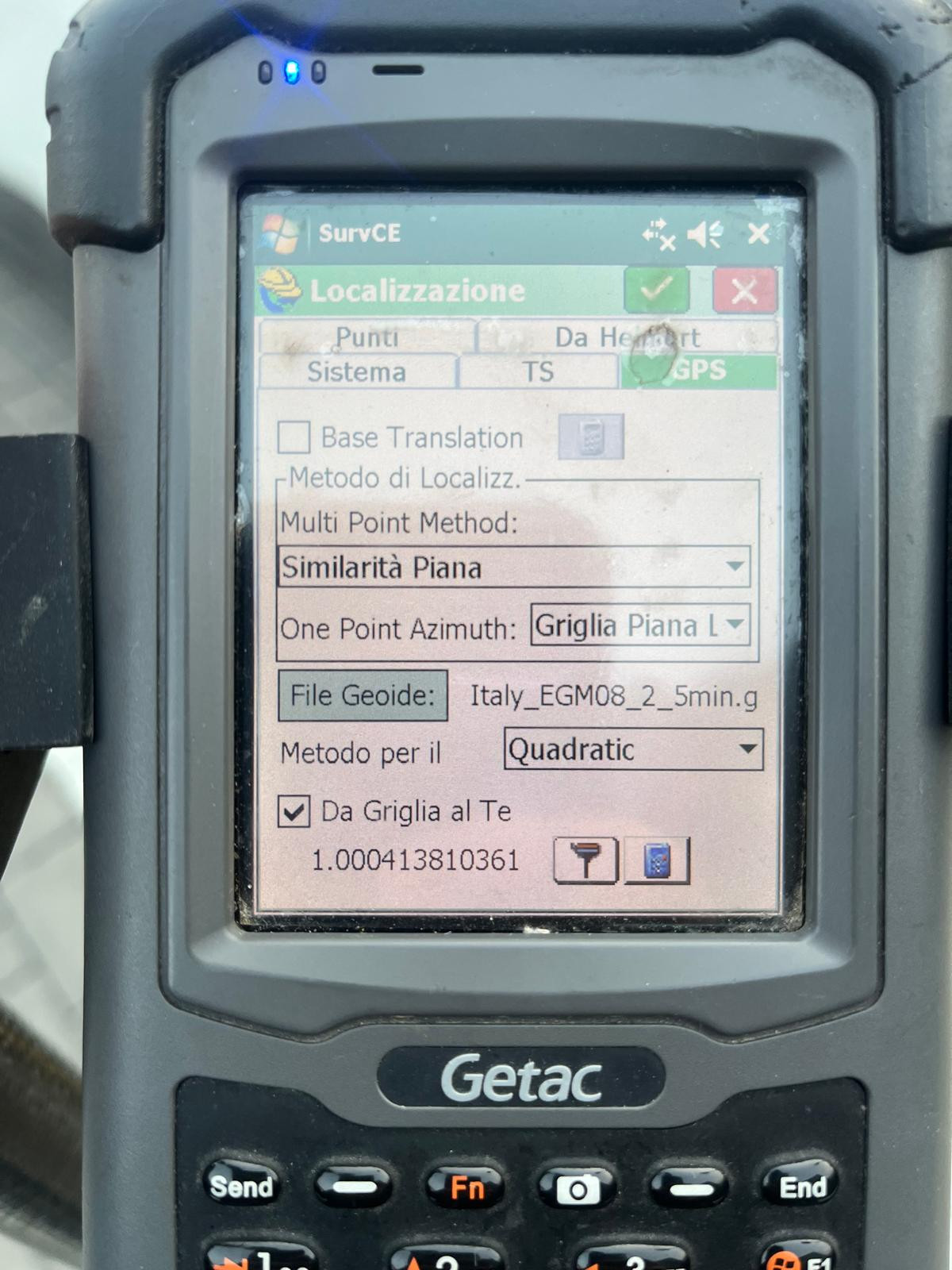
Attached you will find a screenshot from Stonex Cube-a. This is exactly what I am requesting for SurPad. As you can see, Stonex allows the user to set a 'Ground' system where the scale factor is derived from the first point and then kept constant. Notice how the software handles the relationship between the Ellipsoid and the Ground: it adapts the math to the site, not the site to the map. In SurPad, I am missing this 'Site-Calibration-First' logic. Please compare how Stonex manages the Combined Scale Factor versus SurPad’s current dynamic (and backwards) calculation.
Implement Ground-Centric Logic

Vitaly Admin
11 Mar, 2026
Michele Negri
12 Mar, 2026
Hi Vitaly, as already explained in the email, the function exists on Surpad and converts from geodesic to plane... but on the ellipsoid. I need it to calculate the correct scale factor on the geoid to work like a total station. If I measure two points 100 meters apart with the total station, I find the same distance using GNSS. The combined scale used by Surpad is always <1, but this can't be the case in my area because the ellipsoid is always about 40-60 meters lower in elevation than the geoid. Therefore, the combined factor must always be >1.
Michele Negri
18 Mar, 2026
Michele Negri
18 Mar, 2026
The "Ground" configuration (Stonex Style) Projection: Go to Coordinate System > Projection. Scale Factor (k0): Instead of the standard 0.9996, enter 1.000000. Elevation Factor: SurPad will automatically calculate its value based on the average elevation of the survey (or you can force it with your own formula). Result: The final Combined Factor will be the product of 1.000000 \times \text{Elevation Factor}. Example at Cino (1400m): 1.000000 \times 1.000220 = \mathbf{1.000220}. Why are the two software programs "talking" to each other now? By setting the base to 1.000000, you've removed the UTM "contraction." Both software now say the same thing: "We ignore the national map and work only on the actual terrain scale." If Stonex marks 100.04 meters between two pegs, your SurPad will also mark 100.04. The two reliefs, if superimposed, will match perfectly in both distance and shape. The disadvantage (The "Price" of the phenomenon) Be careful, because there's a reason why it doesn't always work this way: "Out of Bubble" Coordinates: Your Easting and Northing coordinates will no longer be the official ones of the Gauss-Boaga or UTM system. They will be shifted by several centimeters (or decimeters if you're far from the time zone center). Problems with the Land Registry: If you export this survey for a Pregeo, the land registry software will give you errors or huge discrepancies because it expects cartographic coordinates (the "narrow" ones of 0.9996), not the "wide" ones you created. In conclusion Want to show off on the construction site? Projection Scale = 1.000000. Your measurements will be perfect for the builder and identical to the Stonex. Do you need to complete a legal/land registry document? Go back to your "Standard Procedure" (Base 0.9996 + elevation correction). It's less "spectacular" because the numbers are < 1, but it's the only one technically correct under Italian law.
Michele Negri
16 Apr, 2026
I'm still waiting for the automatic function to calculate the Grid-to-Ground scale. Now I have to calculate and apply it. Do the developers have any comments?
Michele Negri
12 May, 2026
Per clol che sono (e lo sia tutti), la formula per età la scala da griglia a terra è 1/fattore di scala combinata, che surpad utilizzando la calcola procedura geodetica-planare. Li applica topograficamente ed è corretto perchés si accorcia per localitàre le misure su un ellissoide, ma non se si vuole il contrario. Ne ha bisogno di una terra. La procedura è che misuro un primo punto con una scala di 0,9996 e lo uso calcolo nel di surpad per la scala combinata. Prendo il risultato e lo uso formula nella sopra citata. Nel casoo, 1/0.9995795472 per ogne 1.0004206296 ingresso per (senza calcolo il qui) nella scala generale del "parametro Proiezioni". Let's hope this calculation is introduced automatically.
Regarding this function, SurPad 4.2 has a similar function, Grid to Ground, which can calculate the comprehensive scale factor. The operation method is also similar to the reference picture (SurvCE) provided by you. Please try it. Path: Project->Coordinate System->Grid To Ground
Vitaly Admin
Vitaly Admin